> ## Documentation Index
> Fetch the complete documentation index at: https://docs.push.ai/llms.txt
> Use this file to discover all available pages before exploring further.
# Knowledge
> Create versioned documents that align AI with how your business operates.
## What is Knowledge?
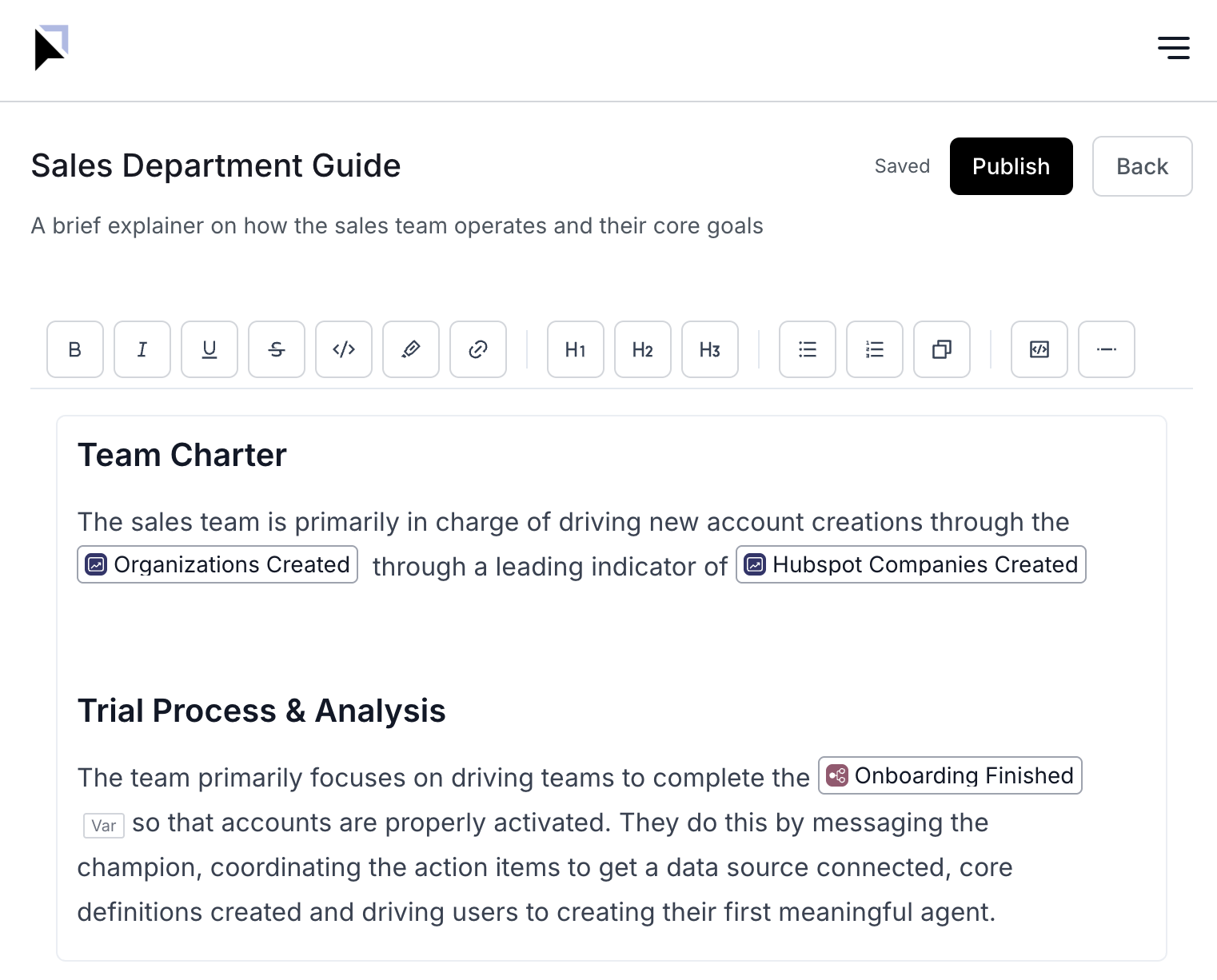
Knowledge documents are versioned guidance that the AI refers to during analysis. A
document’s title and description help the AI understand when it should be used, and
linking the document to nodes on the Business Graph™ scopes where it applies.
 ## Why it matters
* Align AI with your organization’s language, concepts, and decision rubrics
* Produce higher-precision answers and avoid irrelevant exploration
* Generate faster, more accurate Business Reviews with consistent narratives
* Reduce time-to-insight and rework
Knowledge documents are versioned. The AI refers to the latest published version
that is relevant to the user’s question and graph context.
## How it works (at a glance)
* The AI evaluates relevance based on the document’s title, description, content, and
linked Business Graph™ nodes
* The latest published version is considered the active reference for analysis
* Linking to specific nodes (e.g., a metric or model) focuses retrieval and improves
alignment with how your business operates
Write titles and descriptions that clearly communicate when the document should be
used (scope), who it is for (audience), and what it contains (intent).
## Authoring for better AI outcomes
* Intent, audience, scope: describe when-to-use and when-not-to-use
* Domain glossary: acronyms, synonyms, and internal names your team uses
* Canonical definitions and decision criteria, with examples and counterexamples
* Negative guidance: deprecated terms, common pitfalls, and exceptions
## Create a Knowledge document
### Step 1 - Create and title your document
Use a specific, outcome-oriented title and a descriptive summary so the AI can
recognize applicability.
### Step 2 - Add content and save a draft
Capture definitions, rubrics, narratives, and examples that guide analysis. Save as a
draft while collaborating.
### Step 3 - Link to the Business Graph™
Attach the document to relevant nodes so the AI brings it into context at the right
time.
| Node type | Examples | When to link |
| :----------- | :-------------------------------- | :-------------------------------------------------- |
| Model | `sales_orders`, `ad_spend_model` | Authoritative data source or semantic model |
| Metric | `ARR`, `CAC`, `Activation Rate` | Guidance for how to interpret or analyze the metric |
| Dimension | `region`, `segment`, `channel` | Definitions, caveats, or grouping guidance |
| Entity | `Customer`, `Product`, `Campaign` | Context specific to an object in the graph |
| Team/Project | `Marketing`, `Q1 GTM` | Review templates, rituals, or ownership guidance |
Over-linking broad nodes (e.g., root-level departments) can introduce irrelevant
context. Prefer precise links to the exact nodes when possible. Make sure to ground
the AI with context at the proper level
### Step 4 - Publish a version
Publish to make the document the active version the AI refers to. Iterate by creating
new versions as the business changes. You can compare versions and roll back if
needed.
## Evaluate impact and iterate
* Test representative prompts in the Query Agent and look for improved alignment with
your terminology and decision criteria
* If results aren’t aligned, refine the title/description and adjust linked nodes
* Track outcomes such as answer precision, review quality, and time-to-insight
## Usage notes and troubleshooting
* Retrieval favors documents linked to the exact nodes in context
* If a document isn’t being referenced: broaden the title terms, refine links, or add
glossary terms
See the Business Graph™ overview at [/business-graph/how-it-works](/business-graph/how-it-works) and learn about
asking questions in the Query Agent at [/query-agent/query-agent](/query-agent/query-agent).
## Why it matters
* Align AI with your organization’s language, concepts, and decision rubrics
* Produce higher-precision answers and avoid irrelevant exploration
* Generate faster, more accurate Business Reviews with consistent narratives
* Reduce time-to-insight and rework
Knowledge documents are versioned. The AI refers to the latest published version
that is relevant to the user’s question and graph context.
## How it works (at a glance)
* The AI evaluates relevance based on the document’s title, description, content, and
linked Business Graph™ nodes
* The latest published version is considered the active reference for analysis
* Linking to specific nodes (e.g., a metric or model) focuses retrieval and improves
alignment with how your business operates
Write titles and descriptions that clearly communicate when the document should be
used (scope), who it is for (audience), and what it contains (intent).
## Authoring for better AI outcomes
* Intent, audience, scope: describe when-to-use and when-not-to-use
* Domain glossary: acronyms, synonyms, and internal names your team uses
* Canonical definitions and decision criteria, with examples and counterexamples
* Negative guidance: deprecated terms, common pitfalls, and exceptions
## Create a Knowledge document
### Step 1 - Create and title your document
Use a specific, outcome-oriented title and a descriptive summary so the AI can
recognize applicability.
### Step 2 - Add content and save a draft
Capture definitions, rubrics, narratives, and examples that guide analysis. Save as a
draft while collaborating.
### Step 3 - Link to the Business Graph™
Attach the document to relevant nodes so the AI brings it into context at the right
time.
| Node type | Examples | When to link |
| :----------- | :-------------------------------- | :-------------------------------------------------- |
| Model | `sales_orders`, `ad_spend_model` | Authoritative data source or semantic model |
| Metric | `ARR`, `CAC`, `Activation Rate` | Guidance for how to interpret or analyze the metric |
| Dimension | `region`, `segment`, `channel` | Definitions, caveats, or grouping guidance |
| Entity | `Customer`, `Product`, `Campaign` | Context specific to an object in the graph |
| Team/Project | `Marketing`, `Q1 GTM` | Review templates, rituals, or ownership guidance |
Over-linking broad nodes (e.g., root-level departments) can introduce irrelevant
context. Prefer precise links to the exact nodes when possible. Make sure to ground
the AI with context at the proper level
### Step 4 - Publish a version
Publish to make the document the active version the AI refers to. Iterate by creating
new versions as the business changes. You can compare versions and roll back if
needed.
## Evaluate impact and iterate
* Test representative prompts in the Query Agent and look for improved alignment with
your terminology and decision criteria
* If results aren’t aligned, refine the title/description and adjust linked nodes
* Track outcomes such as answer precision, review quality, and time-to-insight
## Usage notes and troubleshooting
* Retrieval favors documents linked to the exact nodes in context
* If a document isn’t being referenced: broaden the title terms, refine links, or add
glossary terms
See the Business Graph™ overview at [/business-graph/how-it-works](/business-graph/how-it-works) and learn about
asking questions in the Query Agent at [/query-agent/query-agent](/query-agent/query-agent).